
ThroneBet app for Android, plus USSD and mobile web betting
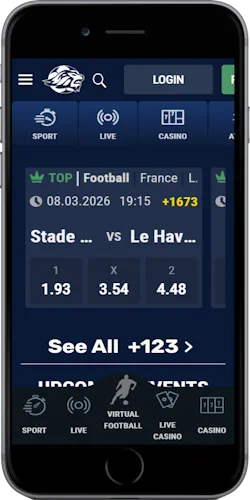
ThroneBet accepts bets through five channels, and three of them live on your phone: the Android app, the mobile browser version and a USSD service that works without internet data. The operator has run in Tanzania since 2014 under Gaming Board of Tanzania licence SBI000000024, and one account works across every channel.

Access channels
Three ways to bet from your phone in Tanzania
Older reviews still call ThroneBet an offline bookmaker with no app at all. That stopped being true years ago: the current terms list five betting channels, and three work from a phone.
One honest caveat before the comparison: there is no iPhone app. The terms name an Android Application only, and nothing by ThroneBet appears in the Apple App Store, so on an iPhone the mobile browser version is the full option rather than a stripped-down fallback. Your choice between the three channels mostly comes down to your device and your data budget.
For daily bettors with an Android phone
Android app
- Direct download from thronebet.com, not on Google Play
- Casino, live casino and virtuals included
- Same login as your website account
- One settings change needed to install
For iPhone users and shared devices
Mobile browser
- Nothing to install or update manually
- The only full option on iPhone
- Runs in any modern browser
- Leaves nothing installed on a shared phone
For feature phones and zero-data days
USSD
- Works without any internet data
- No smartphone required
- A text-menu service for placing bets
- Casino games still need the app or a browser
Dial from any phone keypad. No install needed.
Android setup
Installing the Android app step by step
Google Play does not carry ThroneBet, so the Android app reaches your phone as a direct download from the operator's own website rather than through the store. A Play store search today returns SportPesa, betPawa, SportyBet and Meridianbet, but no ThroneBet listing. Treat any third-party APK site offering a "ThroneBet app" as unsafe and use the Download App entry on thronebet.com instead.
Open the official source
On your Android phone, open thronebet.com and use the Download App menu entry. The file comes from the operator's own domain.
Allow the install once
Android asks permission to install from this source. Grant it for your browser, run the installer, then switch the permission back off.
Sign in with your existing account
Login accepts your phone number, username or account ID with your usual website password. One account works across the app, the browser and USSD.
Register if you are new
Registration asks for your phone number, e-mail, date of birth and a password, then confirms the number by SMS. You must be 18 or older and physically in Tanzania.
Mobile money
Deposits and payouts from your phone
The rule behind most missing deposits is simple: the mobile number you pay from must be identical to the number registered on your ThroneBet account. Pay from a different SIM, even your own second line, and the system has no account to credit. M-Pesa and Airtel Money gateway charges are deducted from the player's account, so the amount that lands can be slightly less than the amount sent.
The floor is low. Deposits start at 100 TSH, withdrawals at 1,000 TSH, and the daily withdrawal cap is 3,000,000 TSH, with the same thresholds across mobile money channels. Two more rules shape real payouts: a withdrawal can be refused if you have played less than 50% of your deposit, and the bet slip shows a 12% tax deduction before your net winnings are calculated.
| Channel | Min deposit | Min withdrawal | Good to know |
|---|---|---|---|
| M-Pesa | 100 TSH | 1,000 TSH | Gateway charges deducted from your account |
| Airtel Money | 100 TSH | 1,000 TSH | The number-match rule applies here too |
| Cash desk | 100 TSH | 1,000 TSH | One of the five betting channels in the terms |
Failure modes
Why a withdrawal code can fail to arrive
Every withdrawal on ThroneBet is confirmed by an SMS code, and the request itself expires fifteen minutes after you make it. That is a security control, not a bug: it stops anyone holding your phone from emptying it.
It collides with a known Tanzanian network problem, though. Users across the country report one-time codes arriving minutes late or not at all, and a code that lands after the window closes leaves the request dead. The fix is mechanical: request the withdrawal again with a stronger signal, switch off any VPN first, and if the code still does not come, call the toll-free line 0 800 712 100 or mail support@thronebet.co.tz.
Bigger amounts trigger identity checks before money moves. Verification can be demanded once your balance reaches 5,000,000 TZS or a single withdrawal reaches 1,000,000 TZS, and you then have 72 hours to supply a passport, driving licence or ID card before the account is suspended. Supply the documents within 30 days and the account recovers.
- Withdrawal request validity: 15 minutes from the request
- Verification trigger: 1,000,000 TZS single withdrawal or 5,000,000 TZS balance
- Document window: 72 hours, then suspension
- Recovery window: 30 days after suspension
- Daily withdrawal cap: 3,000,000 TSH
- Support: 0 800 712 100 (toll-free) and support@thronebet.co.tz
Game scope
Sports, casino and jackpot inside the app
App and mobile site carry the full product line, not a reduced mobile edition. Football leads the sportsbook, with live betting on top competitions; a short delay applies before every live bet is accepted, which is how the operator blocks bets placed after a goal has already gone in. Cash out works on tickets with four or more selections, excluding live events, lost bets and matches that have not started, and a mistaken bet can be cancelled within two hours before kick-off.
Casino games sit in their own tab: slots, crash games including Aviator, live dealer tables and virtuals. Two money rules matter here. Bonus funds work on sports only, never on casino games, and they cannot be withdrawn directly. The ceiling on any single or multi bet win is 120,000,000 TZS.
- Sportsbook: pre-match and live, cash out on tickets with 4+ selections
- Casino: slots, crash games and live dealer tables
- Virtual football, Keno, Dogs and Spin it around the clock
- Daily jackpot: call 12 matches for 100 TZS per ticket, with 5 reserve fixtures covering postponements
Account rules
Account rules that apply on every device
Whichever channel you pick, the same account discipline applies. One customer gets one account, and deliberately running several from the same device or IP address can end with all of them closed and the funds confiscated. VPNs and anonymizers are banned outright. You must be physically inside Tanzania to bet; the service is not licensed abroad.
An account left untouched for three months counts as dormant and can be closed under the terms. ThroneBet is run by THRONEBET COMPANY LIMITED under Betting Control and Licensing Board of Tanzania licence SBI000000024, and the 18-plus rule is enforced at registration and again at verification.